From-Scratch Build · Computer Vision

Panorama Stitcher

Take overlapping snapshots of a skyline and the stitcher fuses them into one wide, seamless panorama — no visible seam, no double edges. The homography math (normalized DLT via SVD) and RANSAC are written from scratch in NumPy; OpenCV supplies ORB features and fast warping, with a pure-NumPy fallback when it's unavailable. It's a working command-line tool, not a description of one.

Python · NumPyDLT homography (from scratch)RANSAC (from scratch) ORB / Harris featuresFeather blending11 passing tests

What it is

Many photos, one seamless image

Stitching looks like image editing but is really geometry. Two photos of the same scene from a slightly turned camera are related by a single mathematical transform — a homography. Find that transform and you can warp one image into the other's frame so they line up exactly. Do it across a sequence and the whole panorama snaps together.

The catch is that the matches you find between images are noisy — plenty of them are wrong. The art of the pipeline is fitting the right transform despite the bad matches, and then blending the overlap so the join disappears. It's a tour of the fundamentals every vision course is built on.

3×3
the homography matrix — nine numbers that capture how one photo relates to the next, and the heart of the whole build.

The demo

Two crops in, one panorama out

The bundled demo splits a 1200×500 textured skyline into two overlapping 744×500 crops, then stitches them back together. ORB finds matches, RANSAC fits the homography that the most matches agree on, and the overlap is feather-blended away.

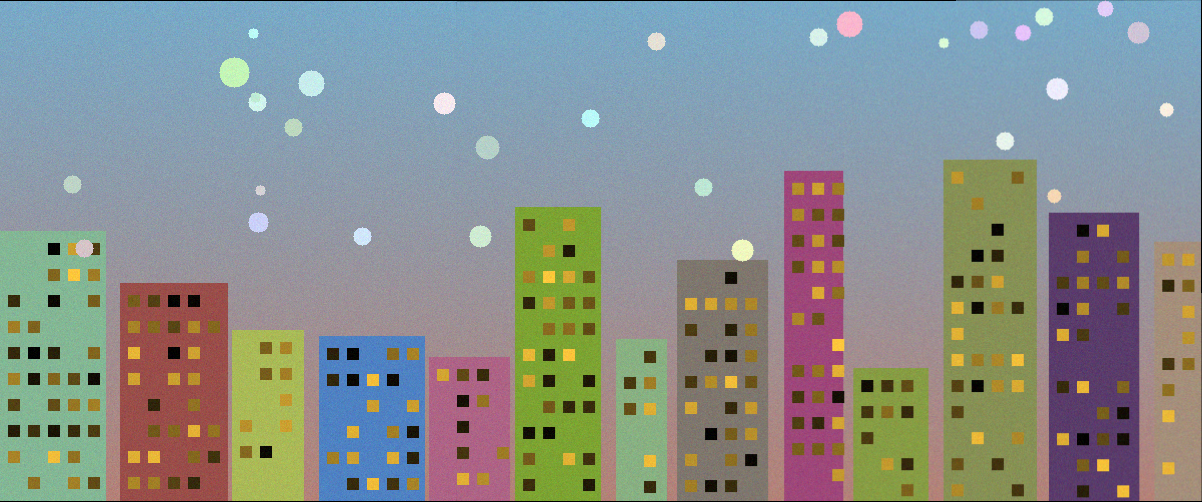
Two overlapping crops of a skyline, side by side
Before — two overlapping crops
The two crops stitched into one seamless panorama
After — stitched panorama (1202×502)
554
feature matches
478
RANSAC inliers · 86%
0.265px
mean reproj. error
1202×502
output (truth: 1200×500)
pip install -r requirements.txt
python stitch.py                       # bundled demo → output.png
python stitch.py a.jpg b.jpg c.jpg -o pano.png   # your own photos
python -m pytest -q                    # 11 passing tests

Numbers above are from a real run on the OpenCV ORB backend. The reconstructed panorama lands within 2 px of the original scene the crops were cut from.

The stack

From loose photos to one panorama

Each stage is a classic vision building block, implemented to actually understand it.

detect

Keypoints

Find distinctive corners and blobs in each image — the anchor points stitching depends on.

describe

Descriptors

Encode the patch around each keypoint so the same point can be recognised across images.

match

Feature matching

Pair up keypoints that describe the same physical point in two overlapping photos.

fit

RANSAC

Estimate the homography from the matches while ruthlessly rejecting the wrong ones.

warp

Perspective warp

Transform each image into a common frame so overlapping regions align pixel for pixel.

blend

Seam blending

Feather the overlap so exposure and edges merge invisibly into one continuous image.

Architecture

How a panorama is built

The code lives in a small panorama/ package plus stitch.py. Each new photo is folded in by the same sequence:

  1. Detect & match · features.py

    ORB keypoints + Hamming brute-force + Lowe ratio test (OpenCV), or Harris corners + NCC patch matching (NumPy fallback).

  2. Estimate H · homography.py

    Normalized Direct Linear Transform: build the 2n×9 system, solve by SVD, Hartley-normalize for conditioning. From scratch in NumPy.

  3. Robust fit · ransac.py

    RANSAC over minimal 4-point samples, inliers counted by reprojection error, adaptive iteration count, refit on all inliers. From scratch.

  4. Warp · blend.py

    Compute the canvas bounding box and reproject each image into a shared frame (OpenCV warpPerspective or NumPy bilinear inverse-map).

  5. Blend · blend.py

    Distance-transform feather weights merge the overlap so the seam disappears, then on to the next photo.

Reflection

What rebuilding it taught me